Smart Meter Installation and Troubleshooting
If you install or operate a solar power system, sooner or later you’re bound to come across the concept of a smart meter. In solar power systems, the smart meter plays a key role in accurately measuring and managing energy flow—but for it to truly fulfill this role, it must be installed correctly and professionally. A poorly connected device provides inaccurate data, causes faulty inverter control, and can even reduce the system’s efficiency.
In this article, we’ll walk you through everything you need to know as an installer about connecting a smart meter: from preparations and connecting the Huawei smart meter to communication settings and troubleshooting. We’ll explain the differences between current transformer-based and direct-measurement solutions, the basics of the RS485 and Modbus protocols, and the most common wiring errors and error messages. At the end of the article, you’ll find a practical checklist, and we’ll also introduce SOLARKIT’s smart meter lineup.
Why is it important to connect a solar smart meter correctly?
The smart meter is the inverter’s “eye”—it detects what’s happening within the system, and the inverter uses its signals to try to prevent the purchase of expensive grid power and to feed solar energy back into the grid at a low cost. Therefore, if the smart meter is connected incorrectly in a solar system, the entire control chain breaks down: the inverter makes decisions based on incorrect data, the anti-backfeed protection cannot function reliably, and the system operates at a lower efficiency than it actually should.
The smart meter plays a particularly important role in the operation of reverse power protection, as it controls the inverter so that the system generates only as much energy as the household actually consumes. If this feedback is inaccurate, the inverter will either unnecessarily throttle back output or—worse yet—feed power back into the grid even when it is not permitted to do so. Both scenarios can have serious consequences: the first reduces the system’s efficiency, while the second may even result in a penalty from the utility provider.
Accurate wiring is therefore not merely a technical requirement, but a fundamental prerequisite for the system’s economical and compliant operation.
The Role of Smart Meters in Solar Panel and Energy Monitoring Systems
Smart meters are intelligent energy and consumption measurement devices that measure voltage, current, power, and energy consumption in real time and transmit data to monitoring systems. Modern smart meters typically communicate with the inverter or controller via a digital interface—such as RS485 or Modbus—thereby supporting data collection, analysis, and remote monitoring alike.
In a solar power system, the smart meter measures in two directions simultaneously: it monitors how much energy the consumer side draws from the grid, as well as how much excess generation would be fed into the grid. The smart meter measures the amount of energy that the system generates in excess of its needs and would feed into the utility grid as surplus, and it signals this to the inverter, which then begins charging the batteries based on this information. This process only works reliably if the smart meter is physically connected in the correct location and with the correct polarity.
In hybrid and battery-based systems, the smart meter plays an even more critical role: the control of charging and discharging cycles is also based on the data it measures, so a poorly positioned device prevents optimal utilization of the energy storage system.
Preparations Before Connecting the Smart Meter
Before you begin the installation, a few preparatory steps are essential for error-free work. First, make sure that the smart meter model is compatible with the inverter—manufacturers typically recommend their own brand or approved devices.
Check the following points before installation:
-
Location of the metering point: The smart meter must always be installed between the main distribution panel and the utility connection, not between the inverter and the distribution panel. If you choose the wrong metering point, the device will not measure the household’s total consumption, but only a portion of it.
-
Phase sequence and polarity: In three-phase systems, the L1–L2–L3 sequence must be strictly observed. The connection is correct if the smart meter displays negative values when the inverter is turned off. If it displays 0 kW, the device has been connected to the wrong location.
-
Cable Length and Shielding: The maximum length of the RS485 communication cable varies by manufacturer, but the generally recommended maximum is 100–150 meters; the use of twisted-pair, shielded cable is recommended to maintain signal quality.
-
DIN rail size: Check that there is sufficient space available in the cabinet—Huawei DTSU666-H models can be mounted on a DIN35 rail.
Basic Steps for Connecting a Huawei Smart Meter
The Huawei DTSU666-H series is among the most commonly used smart meters in residential solar power systems. The device communicates via an RS485 interface and the Modbus-RTU protocol; it is classified as Class I accuracy (±1%), has a voltage measurement accuracy of ±0.5%, and has extremely low power consumption, up to 1 W.
Basic installation steps for a Huawei smart meter:
-
De-energization: All affected circuits must be de-energized before installation begins—this is a basic requirement.
-
Connecting voltage inputs (L1, L2, L3, N): The smart meter’s voltage inputs must be connected to the corresponding busbars in the main distribution panel. The order must match the phase sequence of the current transformers.
-
Installing Current Transformers: The DTSU666-H series is designed for use with current transformers (CTs); external, clamp-on current transformers (CTs) are required for all models. For direct measurement, the DTSU666-HW 80A or the YDS60-80 model is the appropriate choice, as the phase wires pass directly through the device.
-
Connecting the RS485 communication cable: The smart meter’s A(+) and B(-) ports must be connected to the corresponding COM ports on the inverter. Pins 24 and 25 of the smart meter must be connected to the inverter’s communication port.
-
Setting the terminating resistor: A 120-ohm terminating resistor must be connected to the last device on the RS485 bus—on most devices, this can be enabled using a DIP switch.
-
Power-on and verification: After powering on, check the inverter’s display or the FusionSolar app to verify that the smart meter appears as a recognized device and that the measured values are accurate.
Differences Between Current Transformer-Based and Direct-Reading Smart Meter Connections
When planning a smart meter installation, one of the most important decisions is whether to use a current transformer-based or direct-reading solution. The two approaches are not interchangeable: the correct choice depends on the system’s rated current, the characteristics of the electrical panel, and the planned load.
Direct-Measurement Smart Meter
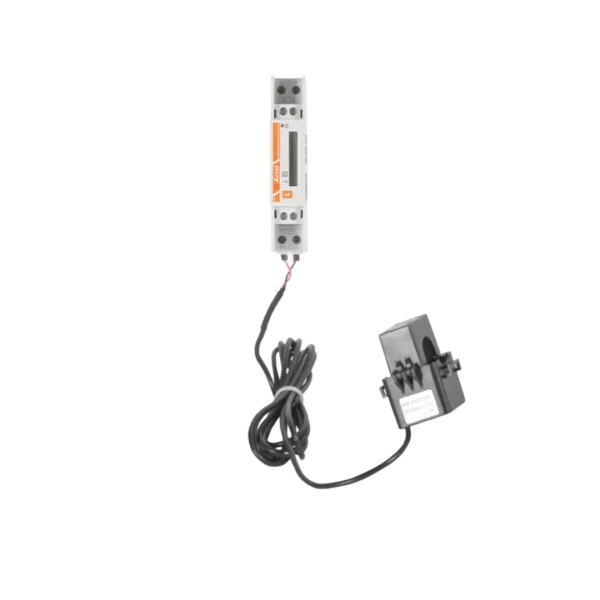
With a direct-measurement smart meter, the phase conductors to be measured flow directly through the device’s current terminals—no external current transformer is required. In this through-flow design, the smart meter has no current transformers; instead, the grid current flows directly through the device, which then performs the measurement. This solution offers simpler wiring, fewer connection points, and a lower risk of error—therefore, for smaller systems where the consumer current does not exceed 80A per phase (the device’s rated current), this is the recommended choice.
In Huawei systems, the DTSU666-HW 80A or the YDS60-80 model is suitable for direct measurement—these devices measure the flowing current directly without a current transformer. In contrast, the DTSU666-H series always uses a CT (current transformer) solution, even for versions with lower rated currents. According to regulations, indirect measurement may be used where the rated current does not exceed 3×100 A. However, if the system is under heavier load or the main circuit breaker rating is higher, a current transformer solution is required.
Current-transformer-based smart meter
In a current transformer-based design, the meter is not connected directly to the phase conductors but receives the measurement signal via external clamp-on current transformers (CTs). With the current transformer solution, both the phases and the current transformers must be connected to the smart meter, and the direction indicator arrow on the current transformers must point toward the meter. The phases must be connected using cable with a maximum cross-sectional area of 1.5 mm², while the current transformers must be connected to the upper and lower terminals with the correct polarity.
Where the rated current reaches or exceeds 3×80 A, current transformer-based metering must be installed. This is particularly important for commercial and industrial systems, as well as for households where an electric vehicle charger, heat pump, or other high-power load is connected to the system.
Comparison of the Two Solutions
|
Criteria |
Direct measurement |
Current transformer measurement |
|
Maximum current |
Over 80 A |
Unlimited (scalable with CT) |
|
Complexity of wiring |
Simpler |
More complex, with multiple components |
|
Probability of failure |
Lower |
Higher (CT direction, polarity) |
|
Application area |
Small to medium-sized households |
Large systems, industrial |
|
Intervention required |
Main circuit break |
CT clamp-on type—no need to disconnect |
One of the critical aspects of a current transformer solution is correctly determining the direction. The current transformer must be installed so that the arrow points toward the load or the source (i.e., the utility grid), and care must be taken to ensure that the phases of the current transformer match the phases of the grid voltage. If this is not done, the meter will display a reversed sign or a zero value, which will lead to incorrect control of the inverter.
It is also important to note that, in a current transformer solution, the secondary terminals of the current transformers must never be left open while the system is energized—this can cause the device to malfunction. Before connecting, always short-circuit the CT’s secondary terminals, and only then connect them to the smart meter.
Communication Settings: RS485, Modbus, and Inverter Connection
Communication between the smart meter and the inverter is one of the most critical aspects of the system. If this connection is not established properly, the inverter operates blindly: it cannot see consumption, cannot regulate generation, and the reverse power protection cannot intervene effectively. Correctly configuring communication is therefore just as important as the physical connection itself.
What is RS485 and why is it used?
Modbus RTU uses the RS485 physical layer, with half-duplex communication and differential signal transmission. This variant is extremely resistant to noise, making it an excellent choice for industrial environments. A single bus can support up to 32 devices, and the maximum cable length can be as long as 1,200 meters, provided the cabling is properly installed.
RS485 has become widespread in solar power systems because it remains stable even over long distances, is noise-resistant, and allows multiple devices—such as inverters, smart meters, and battery managers—to be connected simultaneously. The signal is differential: it measures the voltage difference between the A(+) and B(-) wire pairs, rather than the voltage of individual wires relative to ground, thus minimizing the impact of external noise.
Modbus RTU and Modbus TCP: What’s the Difference?
Modbus is a communication protocol based on a client/server architecture. Communication between devices can occur either via a direct, serial RS-485 connection (Modbus RTU) or over a network (Modbus TCP). The vast majority of smart meters use the Modbus RTU protocol over an RS485 physical layer—this is the more common solution in solar power systems. Modbus TCP is more commonly found in larger, networked systems, energy management platforms, and remotely accessible monitoring systems.
The Communication Cable and Bus Topology
One of the most common mistakes when configuring an RS485 bus is using a star topology. A daisy-chain configuration is recommended, while a star topology should be avoided to minimize communication errors. Both ends of the bus must be terminated with a 120 Ω resistor to prevent signal reflection. The baud rate is typically 9600 or 19200 bps.
When selecting a cable, twisted-pair, shielded (STP) cable is recommended. The shield should be grounded at only one end; otherwise, loop currents will be generated, introducing noise into the bus.
Inverter Connection and Slave ID Configuration
Using RS485 communication, multiple inverters can be connected to the monitoring system. The connector labeled “COM port” on the inverter is used for the RS485 connection. The smart meter acts as a slave device on the RS485 bus, while the inverter acts as the master to retrieve its data.
Every device on the bus must be assigned a unique Slave ID (device address)—if two devices use the same address, a communication conflict occurs, and the inverter cannot distinguish between them. In Huawei systems, the factory-set Slave ID of the DTSU666-H smart meter is typically 1, but this can be changed via the device’s display. On the inverter side, to enable Modbus communication and set the device address, follow the steps described in the manufacturer’s installation guide—these vary by manufacturer.
Verification Options
After configuration, the smart meter should appear as a recognized device on the inverter’s display or in the accompanying mobile app (e.g., FusionSolar for Huawei). If there is no response to the Modbus command, the most common causes are: incorrect baud rate or parity settings, incorrect Slave ID, reversed A and B wiring, missing terminating resistor, or incorrect register address. It’s a good idea to check these one by one before suspecting a hardware failure.
Common wiring errors that installers should avoid
Some smart meter wiring errors are discovered immediately during commissioning—but others only become apparent weeks later, during an unexpected inverter shutdown or a mysterious feed-back alarm. Below, we’ve compiled a list of the typical errors most commonly encountered in the field.
1. Incorrect measurement point—the smart meter is not installed in the right location
This is one of the most common and, at the same time, most damaging errors. The connection is correct if the smart meter displays negative values when the inverter is turned off. If it reads 0 kW, it has been connected in the wrong place. The smart meter must always be placed between the main distribution panel and the utility connection point so that it measures total household consumption and grid energy flow—not at the inverter output, and not at the consumer sub-distribution panel.
2. Reversed phase and neutral wires at the voltage input
If the smart meter was initially connected incorrectly—for example, by swapping the phase and neutral wires—the device may be damaged. In this case, the system can be successfully commissioned using a different smart meter. This error is particularly dangerous because it can physically damage the device, and replacing it will result in extra costs and delays. Before connecting the device, always use a multimeter to verify that the voltage at the terminals is indeed the phase voltage.
3. Incorrect CT Direction or Current Transformer Assigned to the Wrong Phase
One of the most common errors in current transformer (CT) wiring is that the CTs are not connected to the correct phase, or the direction marking does not match the manufacturer’s specifications. You must ensure that the current transformer is oriented in the correct direction and that the phases of the CT match the phases of the line voltage. For example, if the CT associated with L1 is connected to the L2 phase conductor, the smart meter will calculate an incorrect balance, the inverter control will malfunction, and the reverse power protection will not function reliably.
4. Swapping the A and B wires of the RS485
When connecting the communication cable, swapping the A(+) and B(-) wire pairs prevents communication from establishing. In this case, the inverter does not recognize the smart meter and displays an error message—or simply behaves as if the device were not connected. If communication with the smart meter is not established, check the smart meter’s wiring and connect pins 24 and 25 to the inverter’s communication port. Port numbering may vary by manufacturer, so always refer to the specific device’s documentation.
5. Missing or Incorrectly Placed Terminating Resistor
On an RS485 bus, the absence of a terminating resistor causes unstable communication, especially with longer cable runs. Signal reflection causes occasional communication errors: the inverter loses data, monitoring becomes inaccurate, and control may occasionally fail. The terminating resistor must be connected to the last device—this is typically activated via a DIP switch on the device.
6. Use of an Inappropriate Cable
Using a plain, unshielded power cable for communication purposes is one of the most avoidable mistakes. The RS485 bus is particularly sensitive to electromagnetic interference in noisy electrical environments—such as in a distribution panel or near an inverter. Always use twisted-pair, shielded (STP) communication cable, and ground the shield at only one end (typically at the inverter).
7. Rushing During Commissioning
All wiring and commissioning tasks require a high degree of attention to detail, and they simply cannot be done properly if rushed. Most on-site errors—swapped wiring, incorrect CT orientation, forgotten terminating resistors—stem from the installer rushing and failing to perform a systematic check after wiring but before powering on the system. Using a short but thorough checklist (which you’ll find in the next section of this article) can save you the trouble of unnecessary return trips and the cost of potentially replacing equipment.
Interpreting Typical Error Messages and Measurement Discrepancies
Troubleshooting a smart meter after installation largely involves tracing the symptoms displayed on the inverter’s screen or in the mobile app back to their root cause. Below, we’ll go over the most common symptoms and their likely causes.
“Meter communication failure”
This is one of the most common error messages on inverters from Huawei and other manufacturers alike. The inverter is not receiving a response from the smart meter via the RS485 bus. Possible causes, in order: the A(+) and B(-) wires are reversed; an incorrect Slave ID is set on the device or in the inverter; the terminating resistor is missing or incorrectly installed; the cable is broken or makes a poor connection at the terminal blocks. Check these items one by one before replacing the device itself.
The smart meter shows 0 kW during generation
If the smart meter displays 0 kW, the current transformers have likely been installed in the wrong location. For a direct-connection device, this means that the phase wires are not passing through the device—for example, they were connected to the section between the inverter and the distribution panel, rather than to the utility feed-in side. In a current transformer (CT) solution, it’s also possible that the CTs are not in contact with the measured wire at all, or that the secondary cable is broken.
Inaccurate measurement—values differ from expected
If the measurement is inaccurate, the most likely cause is that the phases were not connected correctly. Check that the phases are connected in the correct order at both the smart meter and the utility connection, that the positive and negative wires of the current transformers are connected correctly, and that the direction indicated by the arrow on the current transformers is correct. If the sum of the three phase values is roughly correct but the values of the individual phases are incorrect, this almost certainly indicates a phase sequence problem.
The inverter is feeding power back into the grid despite the restriction
If the anti-feed-in protection is enabled but the inverter is still feeding power into the grid, this most often means that the smart meter is measuring at the wrong point: it is not monitoring the actual feed-in point, but rather a location where the measured value does not reflect the actual grid traffic. In the event of grid feed-in occurring despite the feed-in restriction, the first step is to check whether the anti-backfeed protection is enabled, as this must be configured as soon as possible to avoid penalties from the utility.
The smart meter readings are negative—this is a good sign
It’s worth noting that a negative reading on the smart meter is not an error indication: the connection is correct if the smart meter displays negative values when the inverter is turned off—this means the device is correctly detecting the power drawn from the grid. The negative sign is therefore confirmation of a proper installation.
Solar Panel Smart Meter Wiring Checklist for Installers
The checklist below helps you systematically go through the most important points before turning on the system.
Physical Connection Check
-
The smart meter is installed between the main distribution panel and the utility power supply
-
The order of the voltage inputs (L1, L2, L3, N) is correct and securely fastened
-
For solutions using current transformers (CTs), the CT orientation complies with the manufacturer’s specifications (direction of the arrow)
-
In a current transformer (CT) configuration, the phase assignment of the CTs matches the order of the voltage inputs
-
The communication cable is shielded, twisted-pair (STP) type
-
The RS485 A(+) and B(-) wires have not been swapped
-
The terminating resistor (120 Ω) is connected to the device on the last bus
Checking Communication and Software Settings
-
The smart meter’s Slave ID is unique on the bus
-
The smart meter type and Slave ID are correctly set in the inverter
-
The baud rate setting is the same on the smart meter and the inverter
-
The inverter detects the smart meter (it appears in the device list)
Functional check after power-on
-
The smart meter displays a negative value when the inverter is turned off
-
During power generation, the smart meter readings are realistic and fluctuate
-
Reverse power protection test: the inverter does not feed power back into the grid
-
FusionSolar or another monitoring interface displays real-time data
SOLARKIT smart meter recommendations for solar panels
If you know what to look for when selecting a smart meter for solar panels, the decision isn’t difficult—but the market is full of similar model numbers, and a poor choice can cause serious compatibility issues. SOLARKIT’s range of meters includes devices that can be directly integrated with the inverter systems most commonly installed by local contractors.
The single- and three-phase energy meters in the lineup are MID-compliant, Class 1 accuracy (±1%), typically consume less than 1 W of power, operate reliably at temperatures between –25 and +60 °C, and provide real-time, accurate data to inverters via their DIN-rail mountable design and RS-485/Modbus-RTU communication.
Huawei Smart Meters for Huawei Systems
For installers working within the Huawei FusionSolar ecosystem, the DTSU666-H series is the natural choice. The Huawei DTSU666-H 100A three-phase model is designed for systems with moderate power requirements, while the DTSU666-H 250A is ideal for high-power applications, including industrial ones. Both models are available in stock or on order in the SOLARKIT webstore. For single-phase systems, the Huawei Smart PS-100A offers a compact solution, also featuring Modbus-RTU communication.
It’s worth noting that the Huawei DTSU666-FE model is specifically designed for EV chargers—electric vehicle charging systems—and cannot be substituted with the DTSU666-H: the two devices perform different control functions within the system.
SolaX Smart Meters for SolaX Inverters
The SolaX M3-40 three-phase CT smart meter is the most common pairing with SolaX hybrid and on-grid inverters. Data is transmitted in real time to the inverter and the SolaX Cloud interface; the devices can be mounted on a DIN rail and connect to the inverter via RS485 communication. The Dual version can handle two measurement points simultaneously, which is useful when consumption and feed-in need to be measured separately.
Deye Smart Meters for Deye Inverters
As SOLARKIT is an authorized Deye distributor, the Deye SUN-SMARTCT01 smart meter is also available in our product lineup; it is compatible with both single-phase and three-phase Deye inverters and features a 50 mA CT.
What should you keep in mind when ordering?
The smart meter records in real time how much energy the solar array generates and how much the building consumes, allowing the inverters to be controlled based on actual load and feed-in data. Most utility providers only allow net metering with certified, remotely readable meters, so this investment is also essential for regulatory compliance.
Access to the SOLARKIT webstore requires B2B registration: as an installer, contractor, or reseller, you’ll gain access to current prices, inventory information, and expert technical support after registering. On the solar panel smart meter category page, you can filter by manufacturer, phase number, and function to quickly find the device that suits your specific project.
Frequently Asked Questions
Where should the smart meter be installed in a solar power system?
The smart meter must always be installed between the main distribution panel and the grid feed-in point, not between the inverter and the distribution panel. The inverter must always be connected downstream of the metering point—that is, on the consumer side—since the primary purpose of the system is self-consumption. If the smart meter is installed in the wrong location, it will not measure the household’s total energy consumption but only a portion of it—this causes the inverter’s control to malfunction, and the reverse power protection will not work reliably either. The simplest way to check for proper connection is this: the smart meter should display a negative value when the inverter is turned off and the household is drawing power from the grid.
What is the most common cause of the inverter failing to recognize the smart meter?
A communication error is almost always caused by one or more of the following reasons: the RS485 A(+) and B(−) wires are swapped; the terminating resistor is missing from the end of the RS485 bus; the Slave ID conflicts with a device on another bus; or the baud rate settings differ between the inverter and the smart meter. If communication with the smart meter is not working, the first step is to check the smart meter’s wiring and ensure that the communication pins are correctly connected to the inverter’s port. It’s worth trying these steps one by one before replacing the device itself—most of these errors are caused by wiring or configuration issues, not hardware failures.
When should you choose direct measurement, and when should you opt for a current transformer solution?
The decision depends primarily on the system’s rated current. Where the rated current reaches or exceeds 3×100 A, a current transformer-based measurement system must be installed. In practice, this means that for smaller residential systems, a direct-measurement smart meter is a simpler and more reliable solution, while for higher-capacity commercial or industrial systems—or sites that include electric vehicle chargers or heat pumps—a current transformer-based solution is the standard and safe choice. With a current transformer (CT) connection, special attention must be paid to the correct orientation and phase assignment of the CTs—these are the most common sources of error in this solution.
Why does the smart meter show 0 kW when the system is generating power?
If the smart meter shows 0 kW, it most often means that the current transformers were installed in the wrong location. With a direct-connection meter, this may mean that the phase wires are not running through the smart meter but are bypassing it. With a current transformer (CT) solution, it’s also possible that the CTs are not making contact with the measured wire at all, the secondary cable is broken, or the CTs have been connected to the neutral or PE wire instead of the phases. It’s a good idea to check the measured values on the smart meter’s display as well, not just on the inverter’s monitoring interface, to rule out the possibility of a communication error.
Is a smart meter required for reverse power protection to function?
Yes, reverse power protection cannot function reliably without a smart meter. The smart meter regulates the inverter so that the system generates exactly as much energy as the household is currently consuming—this requires real-time, accurate measurement data from the grid feed-in point. Without a smart meter, the inverter cannot see the current consumption and therefore cannot dynamically regulate production. With some inverters, operation without a smart meter is possible in the short term by connecting the current transformers directly to the inverter, but calibration must be performed afterward, and this can only be considered a temporary solution.